Getting Started
Learn how to access the Propra API
Using the Propra API requires creating some authentication credentials. To create new credentials for integrations, navigate to the Account Settings page using the left-hand navigation.

From there, click on the Integrations tab.
Only account Administrators have access to create integration credentials
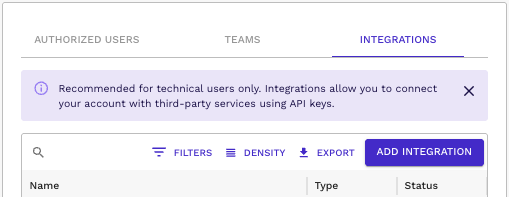
Click the ADD INTEGRATION button to start the process.
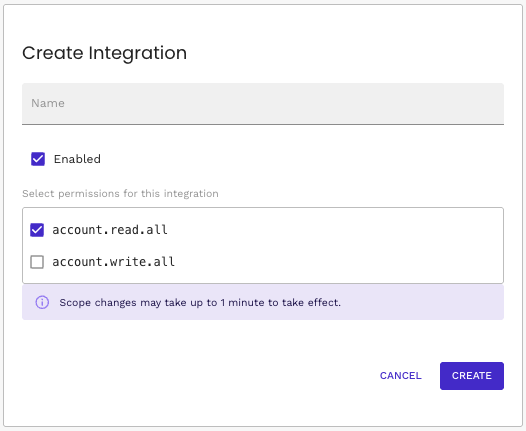
You can use any descriptive Name for your integration that will help you. The integration must have Enabled checked in order for its credentials to be valid. To access any data, the integration must have basic read access at a minimum. Both account.read.all and account.write.all grant read access to all data in the account.
After creating the new integration, click on its row in the table to view its details, including the 2-part credentials.
Be careful with the secret credentials, they allow anyone with those tokens to access data in your account!
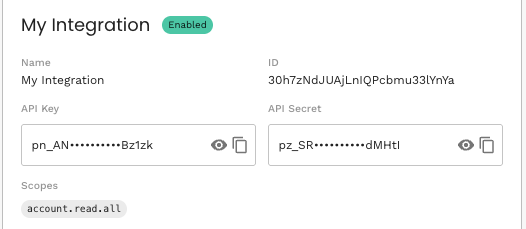
The API Key is used to identify the specific integration and must be provided in the X-Api-Key header for all requests. The API Secret is used for authorization and must be provided in the Authorization header for all requests.
curl --request GET \
  --url 'https://propra.app/api/v1/requests?first=1' \
  --header 'authorization: pz_exampleAPIsecret' \
  --header 'x-api-key: pn_exampleAPIkey'